BEYABLE Ranking API
Product Ranking API Documentation
Overview
The Product Ranking API is a server-side solution for optimizing product listings on e-commerce websites. The BEYABLE Platform enables you to define sophisticated ranking rules based on product attributes and performance scores to improve merchandising and conversion rates.
Key Concepts
Product Ranking
Product ranking optimization allows you to control the order in which products appear in your listings based on:
- Product Attributes: prices, stock levels, colors, sizes, margins, and other custom attributes
- Statistical Scores: behavioral data and product performance metrics
- AI Scores: machine learning-based predictions of product performance
Account ID
Your unique account identifier in UUID format without hyphens (32 hexadecimal characters). This identifies your BEYABLE Platform account.
Tenants
A tenant represents any subdivision of your account, allowing you to define specific ranking rules for different contexts:
- Country or culture-specific sites
- Individual stores or brands
- Any other logical division of your business
You can define separate ranking rules for each tenant to accommodate different business strategies or market conditions.
Segments
Segments represent visitor groups that may require different product ranking strategies. Segments can be:
- Calculated by the BEYABLE Platform based on visitor behavior
- Provided by your own systems
- Supplied by third-party segmentation tools
Segmented ranking is an optional feature that allows you to apply different ranking rules based on visitor characteristics.
Ranking Rules
Rules are the core logic that determines product order. You can:
- Define as many rules as needed
- Map rules to different product listings
- Use a single rule across multiple listings
- Combine multiple criteria within a single rule
A/B Testing
The API response includes an abTestGroup field. In most cases, this field will be empty. When you configure A/B testing for your ranking rules in the BEYABLE Platform, this field will contain the test group identifier, allowing you to run experiments comparing different ranking strategies.
Implementation Workflow
Standard Implementation
- Call the API to retrieve product ranks for a given rule
- Parse the CSV response to extract ProductId, abTestGroup, and Position
- Store the ranks in your database
- Apply the ranks in your server-side queries when building product listings
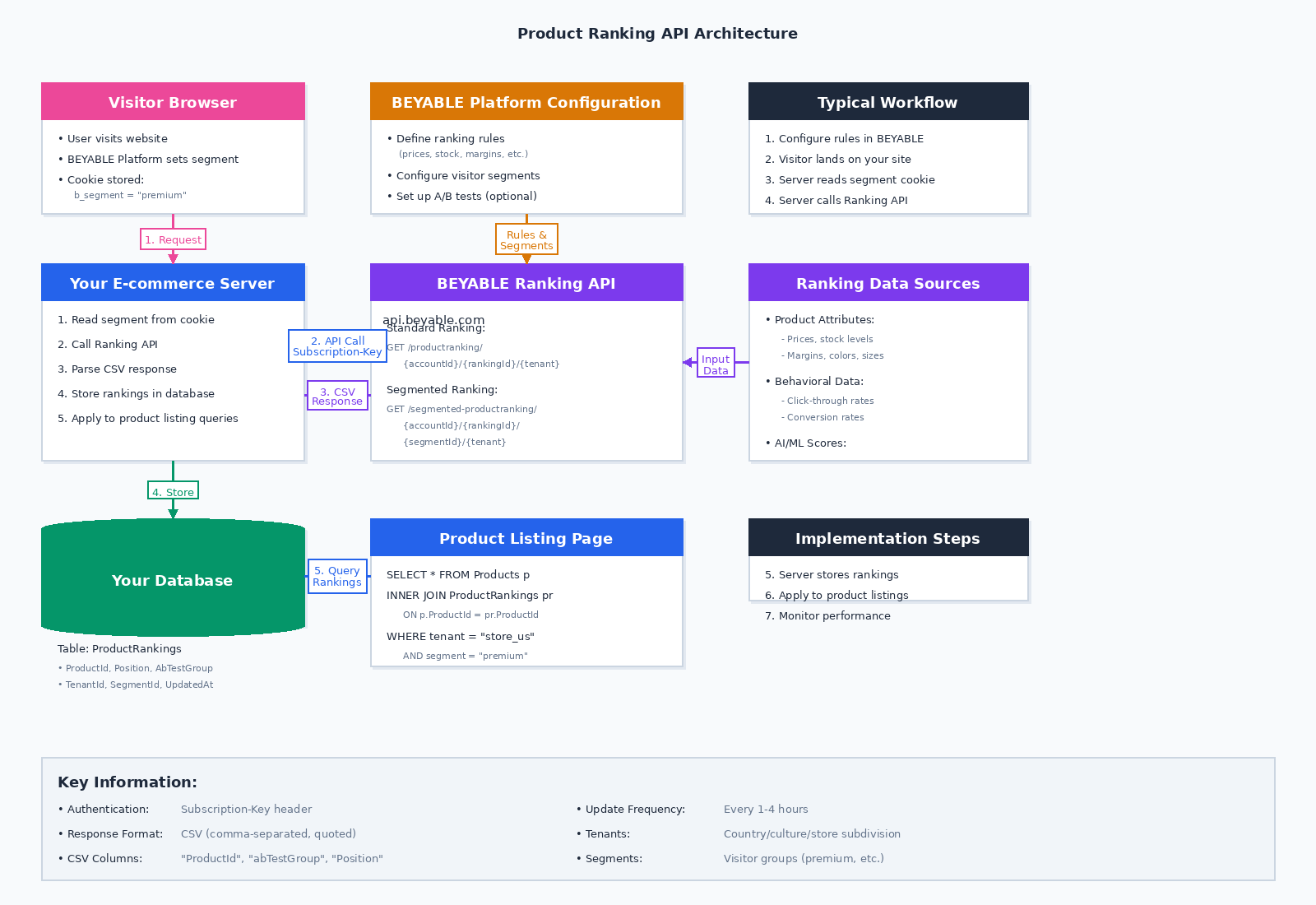
Segmented Ranking Implementation
When working with segmented ranking:
- Define segments in the BEYABLE Platform interface
- BEYABLE Platform automatically:
- Matches visitors to appropriate segments
- Creates a cookie containing the visitor's segment ID
- Your implementation:
- Read the segment cookie from the visitor's browser
- Call the API with the appropriate segment identifier
- Apply the corresponding segment-specific ranks to your listing
API Reference
Base URL
https://api.eu1.beyable.com
Authentication
All API requests require a subscription key passed in the request header.
Header:
Subscription-Key: YOUR_SUBSCRIPTION_KEY
1. Product Ranking (No Segmentation)
Retrieve product rankings without tenant or segmentation.
Endpoint
GET /productranking/{accountId}/{rankingId}
Path Parameters
| Parameter | Type | Required | Description | Format |
|---|---|---|---|---|
accountId | string | Yes | Account identifier (UUID without hyphens) | 32 hex characters matching ^[0-9a-f]{32}$ |
rankingId | string | Yes | Ranking rule identifier (UUID without hyphens) | 32 hex characters matching ^[0-9a-f]{32}$ |
Request Example
GET /productranking/a1b2c3d4e5f6789012345678901234ab/f9e8d7c6b5a4321098765432109876fe HTTP/1.1
Host: api.eu1.beyable.com
Subscription-Key: YOUR_SUBSCRIPTION_KEY
cURL Example:
curl -X GET \
  "https://api.eu1.beyable.com/productranking/a1b2c3d4e5f6789012345678901234ab/f9e8d7c6b5a4321098765432109876fe" \
  -H "Subscription-Key: YOUR_SUBSCRIPTION_KEY"
Response
Content-Type: text/csv
Format: CSV file with comma-separated values and quoted strings
Columns:
ProductId: Product identifierabTestGroup: A/B test group identifier (empty if no A/B test)Position: Ranking position (1-based)
Response Example
Standard Response (No A/B Test):
"ProductId","abTestGroup","Position"
"5505","",1
"5506","",2
"5507","",3
"5508","",4
"5509","",5
"5510","",6
With A/B Testing (Edge Case):
"ProductId","abTestGroup","Position"
"5505","abTest1",1
"5506","abTest1",2
"5507","abTest1",3
"5508","abTest2",1
"5509","abTest2",2
"5510","abTest2",3
2. Product Ranking (With Tenant)
Retrieve product rankings for a specific tenant without segmentation.
Endpoint
GET /productranking/{accountId}/{rankingId}/{tenant}
Path Parameters
| Parameter | Type | Required | Description | Format |
|---|---|---|---|---|
accountId | string | Yes | Account identifier (UUID without hyphens) | 32 hex characters matching ^[0-9a-f]{32}$ |
rankingId | string | Yes | Ranking rule identifier (UUID without hyphens) | 32 hex characters matching ^[0-9a-f]{32}$ |
tenant | string | Yes | Account tenant identifier | Any string |
Request Example
GET /productranking/a1b2c3d4e5f6789012345678901234ab/f9e8d7c6b5a4321098765432109876fe/store_us HTTP/1.1
Host: api.eu1.beyable.com
Subscription-Key: YOUR_SUBSCRIPTION_KEY
cURL Example:
curl -X GET \
  "https://api.eu1.beyable.com/productranking/a1b2c3d4e5f6789012345678901234ab/f9e8d7c6b5a4321098765432109876fe/store_us" \
  -H "Subscription-Key: YOUR_SUBSCRIPTION_KEY"
Response
Content-Type: text/csv
Format: CSV file with comma-separated values and quoted strings
Columns:
ProductId: Product identifierabTestGroup: A/B test group identifier (empty if no A/B test)Position: Ranking position (1-based)
Response Example
"ProductId","abTestGroup","Position"
"5505","",1
"5506","",2
"5507","",3
3. Segmented Product Ranking (Default Tenant)
Retrieve product rankings with segmentation for the default tenant.
Endpoint
GET /segmented-productranking/{accountId}/{segmentedRankingId}/{segmentId}
Path Parameters
| Parameter | Type | Required | Description | Format |
|---|---|---|---|---|
accountId | string | Yes | Account identifier (UUID without hyphens) | 32 hex characters matching ^[0-9a-f]{32}$ |
segmentedRankingId | string | Yes | Segmented ranking identifier (UUID without hyphens) | 32 hex characters matching ^[0-9a-f]{32}$ |
segmentId | string | Yes | Segment identifier | Any string |
Request Example
GET /segmented-productranking/a1b2c3d4e5f6789012345678901234ab/f9e8d7c6b5a4321098765432109876fe/segment_premium HTTP/1.1
Host: api.eu1.beyable.com
Subscription-Key: YOUR_SUBSCRIPTION_KEY
cURL Example:
curl -X GET \
  "https://api.eu1.beyable.com/segmented-productranking/a1b2c3d4e5f6789012345678901234ab/f9e8d7c6b5a4321098765432109876fe/segment_premium" \
  -H "Subscription-Key: YOUR_SUBSCRIPTION_KEY"
Response
Content-Type: text/csv
Format: CSV file with comma-separated values and quoted strings
Columns:
ProductId: Product identifierabTestGroup: A/B test group identifier (empty if no A/B test)Position: Ranking position (1-based)
Response Example
"ProductId","abTestGroup","Position"
"5505","",1
"5506","",2
"5507","",3
4. Segmented Product Ranking (With Tenant)
Retrieve product rankings with both segmentation and tenant specification.
Endpoint
GET /segmented-productranking/{accountId}/{segmentedRankingId}/{segmentId}/{tenant}
Path Parameters
| Parameter | Type | Required | Description | Format |
|---|---|---|---|---|
accountId | string | Yes | Account identifier (UUID without hyphens) | 32 hex characters matching ^[0-9a-f]{32}$ |
segmentedRankingId | string | Yes | Segmented ranking identifier (UUID without hyphens) | 32 hex characters matching ^[0-9a-f]{32}$ |
segmentId | string | Yes | Segment identifier | Any string |
tenant | string | Yes | Account tenant identifier | Any string |
Request Example
GET /segmented-productranking/a1b2c3d4e5f6789012345678901234ab/f9e8d7c6b5a4321098765432109876fe/segment_premium/store_us HTTP/1.1
Host: api.eu1.beyable.com
Subscription-Key: YOUR_SUBSCRIPTION_KEY
cURL Example:
curl -X GET \
  "https://api.eu1.beyable.com/segmented-productranking/a1b2c3d4e5f6789012345678901234ab/f9e8d7c6b5a4321098765432109876fe/segment_premium/store_us" \
  -H "Subscription-Key: YOUR_SUBSCRIPTION_KEY"
Response
Content-Type: text/csv
Format: CSV file with comma-separated values and quoted strings
Columns:
ProductId: Product identifierabTestGroup: A/B test group identifier (empty if no A/B test)Position: Ranking position (1-based)
Response Example
"ProductId","abTestGroup","Position"
"5505","",1
"5506","",2
"5507","",3
HTTP Status Codes
| Status Code | Description |
|---|---|
| 200 | Success - rankings retrieved |
| 400 | Bad Request - invalid parameters |
| 401 | Unauthorized - missing or invalid subscription key |
| 404 | Not Found - account, rule, segment, or tenant not found |
| 429 | Too Many Requests - rate limit exceeded |
| 500 | Internal Server Error |
Working with Segments
Reading the Segment Cookie
When the BEYABLE Platform assigns a segment to a visitor, it stores the segment ID in a browser cookie.
Cookie Name: b_segment (verify actual cookie name in your BEYABLE Platform configuration)
Example (JavaScript):
function getVisitorSegment() {
  const cookies = document.cookie.split(';');
  for (let cookie of cookies) {
    const [name, value] = cookie.trim().split('=');
    if (name === 'b_segment') {
      return value;
    }
  }
  return null; // No segment assigned
}
Example (Server-side - C#):
public string GetVisitorSegment(HttpRequest request)
{
    if (request.Cookies.TryGetValue("b_segment", out string segmentId))
    {
        return segmentId;
    }
    return null; // No segment assigned
}
Applying Segmented Rankings
Once you retrieve the segment ID from the cookie:
- Include it in your API request as the
segmentIdpath parameter - The API will return rankings specific to that segment in CSV format
- Parse the CSV and apply those rankings to your product listing query
Example Flow:
Visitor Request → Read Segment Cookie → Call API with SegmentId →
Parse CSV Response → Store/Use Rankings → Display Optimized Listing
CSV Response Parsing
Parsing Examples
C# Example:
using System.IO;
using System.Linq;
using System.Net.Http;
using System.Threading.Tasks;
using CsvHelper;
using CsvHelper.Configuration;

public class ProductRanking
{
    public string ProductId { get; set; }
    public string AbTestGroup { get; set; }  // Will be empty string or null when no A/B test
    public int Position { get; set; }
}

public class RankingApiClient
{
    private readonly HttpClient _httpClient;
    private readonly string _subscriptionKey;

    public RankingApiClient(string subscriptionKey)
    {
        _httpClient = new HttpClient();
        _subscriptionKey = subscriptionKey;
    }

    public async Task<List<ProductRanking>> GetRankingsAsync(string accountId, string rankingId, string tenant = null)
    {
        var url = string.IsNullOrEmpty(tenant)
            ? $"https://api.eu1.beyable.com/productranking/{accountId}/{rankingId}"
            : $"https://api.eu1.beyable.com/productranking/{accountId}/{rankingId}/{tenant}";

        var request = new HttpRequestMessage(HttpMethod.Get, url);
        request.Headers.Add("Subscription-Key", _subscriptionKey);

        var response = await _httpClient.SendAsync(request);
        response.EnsureSuccessStatusCode();

        var csvContent = await response.Content.ReadAsStringAsync();
        return ParseRankingCsv(csvContent);
    }

    private List<ProductRanking> ParseRankingCsv(string csvContent)
    {
        using (var reader = new StringReader(csvContent))
        using (var csv = new CsvReader(reader, new CsvConfiguration(CultureInfo.InvariantCulture)))
        {
            return csv.GetRecords<ProductRanking>().ToList();
        }
    }
}
Python Example:
import csv
import requests
from io import StringIO

def get_rankings(account_id, ranking_id, subscription_key, tenant=None):
    if tenant:
        url = f"https://api.eu1.beyable.com/productranking/{account_id}/{ranking_id}/{tenant}"
    else:
        url = f"https://api.eu1.beyable.com/productranking/{account_id}/{ranking_id}"

    headers = {
        'Subscription-Key': subscription_key
    }

    response = requests.get(url, headers=headers)
    response.raise_for_status()

    return parse_ranking_csv(response.text)

def parse_ranking_csv(csv_content):
    rankings = []
    reader = csv.DictReader(StringIO(csv_content))
    for row in reader:
        rankings.append({
            'product_id': row['ProductId'],
            'ab_test_group': row['abTestGroup'] if row['abTestGroup'] else None,  # Empty string becomes None
            'position': int(row['Position'])
        })
    return rankings
JavaScript/Node.js Example:
const axios = require('axios');
const parse = require('csv-parse/sync');

async function getRankings(accountId, rankingId, subscriptionKey, tenant = null) {
  const url = tenant
    ? `https://api.eu1.beyable.com/productranking/${accountId}/${rankingId}/${tenant}`
    : `https://api.eu1.beyable.com/productranking/${accountId}/${rankingId}`;

  const response = await axios.get(url, {
    headers: {
      'Subscription-Key': subscriptionKey
    }
  });

  return parseRankingCsv(response.data);
}

function parseRankingCsv(csvContent) {
  const records = parse.parse(csvContent, {
    columns: true,
    skip_empty_lines: true
  });

  return records.map(record => ({
    productId: record.ProductId,
    abTestGroup: record.abTestGroup || null,  // Empty string becomes null
    position: parseInt(record.Position)
  }));
}
Database Integration
Recommended Storage Schema
Store rankings in a dedicated table for efficient retrieval:
CREATE TABLE ProductRankings (
    AccountId VARCHAR(32) NOT NULL,
    RankingId VARCHAR(32) NOT NULL,
    TenantId VARCHAR(100),
    SegmentId VARCHAR(100),
    ProductId VARCHAR(100) NOT NULL,
    AbTestGroup VARCHAR(50) NULL,  -- Usually NULL, only populated when A/B testing is configured
    Position INT NOT NULL,
    UpdatedAt DATETIME NOT NULL,
    PRIMARY KEY (AccountId, RankingId, TenantId, SegmentId, ProductId),
    INDEX idx_lookup (AccountId, RankingId, TenantId, SegmentId, Position)
);
Complete Integration Example (C#)
public class RankingService
{
    private readonly HttpClient _httpClient;
    private readonly string _accountId;
    private readonly string _subscriptionKey;
    private readonly IDbConnection _dbConnection;

    public RankingService(string accountId, string subscriptionKey, IDbConnection dbConnection)
    {
        _httpClient = new HttpClient();
        _accountId = accountId;
        _subscriptionKey = subscriptionKey;
        _dbConnection = dbConnection;
    }

    public async Task<List<ProductRanking>> GetAndStoreRankings(
        string rankingId,
        string tenant = null,
        string segmentId = null)
    {
        // Build the appropriate URL
        string url = BuildApiUrl(rankingId, tenant, segmentId);

        // Call the API
        var request = new HttpRequestMessage(HttpMethod.Get, url);
        request.Headers.Add("Subscription-Key", _subscriptionKey);

        var response = await _httpClient.SendAsync(request);
        response.EnsureSuccessStatusCode();

        // Parse CSV response
        string csvContent = await response.Content.ReadAsStringAsync();
        var rankings = ParseRankingCsv(csvContent);

        // Store in database
        await StoreRankingsInDatabase(rankings, rankingId, tenant, segmentId);

        return rankings;
    }

    private string BuildApiUrl(string rankingId, string tenant, string segmentId)
    {
        if (!string.IsNullOrEmpty(segmentId) && !string.IsNullOrEmpty(tenant))
        {
            return $"https://api.eu1.beyable.com/segmented-productranking/{_accountId}/{rankingId}/{segmentId}/{tenant}";
        }
        else if (!string.IsNullOrEmpty(segmentId))
        {
            return $"https://api.eu1.beyable.com/segmented-productranking/{_accountId}/{rankingId}/{segmentId}";
        }
        else if (!string.IsNullOrEmpty(tenant))
        {
            return $"https://api.eu1.beyable.com/productranking/{_accountId}/{rankingId}/{tenant}";
        }
        else
        {
            return $"https://api.eu1.beyable.com/productranking/{_accountId}/{rankingId}";
        }
    }

    private async Task StoreRankingsInDatabase(
        List<ProductRanking> rankings,
        string rankingId,
        string tenant,
        string segmentId)
    {
        // Clear existing rankings for this configuration
        await _dbConnection.ExecuteAsync(@"
            DELETE FROM ProductRankings
            WHERE AccountId = @AccountId
                AND RankingId = @RankingId
                AND TenantId = @TenantId
                AND SegmentId = @SegmentId",
            new { AccountId = _accountId, RankingId = rankingId, TenantId = tenant, SegmentId = segmentId });

        // Insert new rankings
        await _dbConnection.ExecuteAsync(@"
            INSERT INTO ProductRankings
                (AccountId, RankingId, TenantId, SegmentId, ProductId, AbTestGroup, Position, UpdatedAt)
            VALUES
                (@AccountId, @RankingId, @TenantId, @SegmentId, @ProductId, @AbTestGroup, @Position, @UpdatedAt)",
            rankings.Select(r => new
            {
                AccountId = _accountId,
                RankingId = rankingId,
                TenantId = tenant,
                SegmentId = segmentId,
                r.ProductId,
                r.AbTestGroup,
                r.Position,
                UpdatedAt = DateTime.UtcNow
            }));
    }
}
Applying Rankings in Queries
Example Query (Standard Ranking):
SELECT p.*
FROM Products p
INNER JOIN ProductRankings pr
    ON p.ProductId = pr.ProductId
WHERE pr.AccountId = @accountId
    AND pr.RankingId = @rankingId
    AND pr.TenantId = @tenantId
    AND pr.SegmentId IS NULL
ORDER BY pr.Position ASC;
Example Query (Segmented Ranking):
SELECT p.*
FROM Products p
INNER JOIN ProductRankings pr
    ON p.ProductId = pr.ProductId
WHERE pr.AccountId = @accountId
    AND pr.RankingId = @rankingId
    AND pr.TenantId = @tenantId
    AND pr.SegmentId = @segmentId
ORDER BY pr.Position ASC;
Example Query with A/B Test Filtering (Edge Case):
SELECT p.*
FROM Products p
INNER JOIN ProductRankings pr
    ON p.ProductId = pr.ProductId
WHERE pr.AccountId = @accountId
    AND pr.RankingId = @rankingId
    AND pr.TenantId = @tenantId
    AND pr.AbTestGroup = @abTestGroup  -- Only needed when A/B testing is active
ORDER BY pr.Position ASC;
Best Practices
Caching Strategy
- Cache API responses to minimize latency
- Refresh rankings periodically (recommended: every 1-4 hours depending on data freshness requirements)
- Implement fallback logic if rankings are temporarily unavailable
- Consider the staleness tolerance for your use case
Error Handling
- Always have a default ranking strategy if the API is unavailable
- Log API failures for monitoring and debugging
- Implement exponential backoff for retry logic
- Handle CSV parsing errors gracefully
- Validate subscription key before making requests
Performance Optimization
- Retrieve rankings asynchronously during off-peak hours
- Index your rankings table appropriately for fast lookups
- Consider pre-computing and caching segment-specific listings for high-traffic segments
- Use bulk insert operations when storing rankings in your database
- Compress large CSV responses if supported by your infrastructure
Monitoring
Track key metrics:
- API response times and success rates
- Ranking refresh frequency and failures
- CSV parsing errors
- Segment coverage (percentage of visitors assigned to segments)
- Database query performance
- Business impact (conversion rate by ranking rule)
- A/B test performance (only if A/B testing is configured)
A/B Testing Considerations (Optional)
If you're using A/B testing features in the BEYABLE Platform:
- Track which A/B test group each visitor sees
- Ensure consistent A/B test assignment per visitor session
- Store A/B test group assignments for proper attribution analysis
- Monitor conversion metrics by A/B test group
- Filter rankings by A/B test group when applying to product listings
Quick Start Guide
Step 1: Get Your Credentials
Contact your BEYABLE Platform account manager to obtain:
- Your
accountId(32-character UUID without hyphens) - Your API subscription key
- Your
rankingIdorsegmentedRankingId
Step 2: Make Your First API Call
curl -X GET \
  "https://api.eu1.beyable.com/productranking/YOUR_ACCOUNT_ID/YOUR_RANKING_ID" \
  -H "Subscription-Key: YOUR_SUBSCRIPTION_KEY"
Step 3: Parse and Store the Rankings
Use the CSV parsing examples above to process the response and store it in your database.
Step 4: Apply Rankings to Your Listings
Update your product listing queries to join with the rankings table and order by position.
Step 5: Monitor and Optimize
Track the performance of your rankings and iterate on your rules in the BEYABLE Platform.
Authentication
- API Key: apiKeyHeader
- API Key: apiKeyQuery
| Security Scheme Type: | apiKey |
|---|---|
| Header parameter name: | Subscription-key |
| Security Scheme Type: | apiKey |
|---|---|
| Header parameter name: | subscription-key |